In the header of any Order Management page, you'll see the option to manage "My Account." Here, you can edit your account and shipping details, view order history associated with your account, and view optional admin teams and settings.
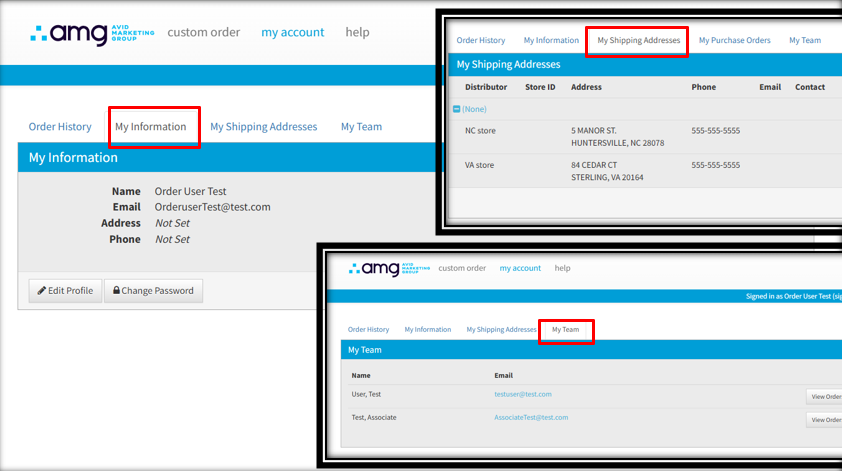
The "My Information" tab lists your profile information and the option to edit your profile and password.
Under "My Shipping Addresses," you can store your shipping information for In-Store paper offers. Shipping addresses you add here will be your options to select from when you place orders for print items. (Shipping addresses are not required for digital orders.)
The "My Team" tabs allows supervisors to see other associate orders. AMG can assign supervisors to users - contact your AMG representative for assistance setting up your team if applicable.
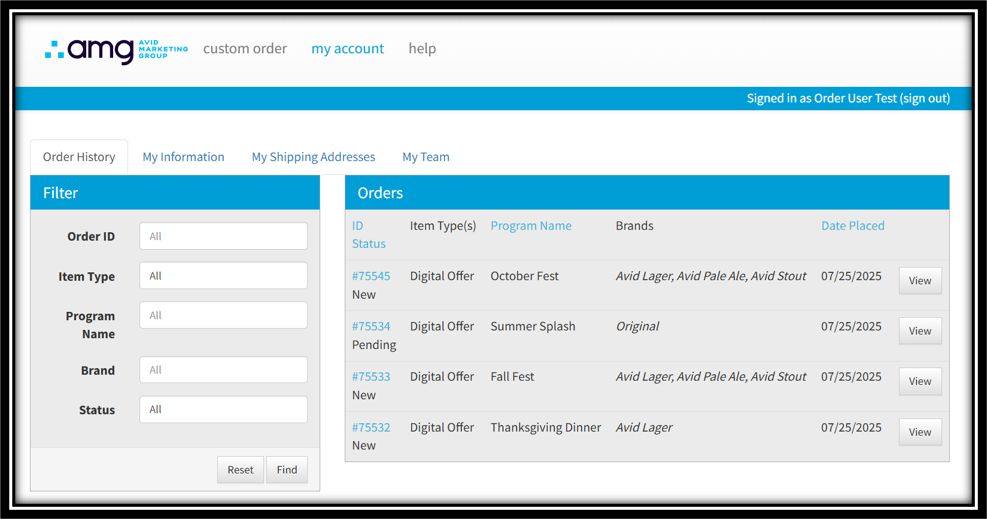
The "Order History" tab allows you to view your past orders. To the left, you can search and filter to find a specific order; or you can browse and manage your recent orders to the right.
Was this article helpful?
That’s Great!
Thank you for your feedback
Sorry! We couldn't be helpful
Thank you for your feedback
Feedback sent
We appreciate your effort and will try to fix the article